Improving LM Studio's MLX Engine for Agentic Workflows
We recently released mlx-engine v1.8.5 in LM Studio. This update dramatically improves performance for repeated, long-context agentic workflows by checkpointing your KV cache. It also adds continuous batching for VLM requests. This work is open source; you can view the PR here.
In this post, I’ll explain the cache-reuse problem this solves, why current open-source LLM models make rewinding harder, and how the new disk-backed cache works. Our benchmarks show up to 80% lower extra RAM usage, up to 2x more throughput, and up to 3.5x faster processing for image requests.
Adrien uses the new mlx-engine for a local review of a URL-shortener app with codex --oss.
What is mlx-engine?
MLX Engine (mlx-engine) is an MIT-licensed inference engine optimized for Apple silicon. It was created and maintained by LM Studio. It uses Apple's MLX machine learning library, and builds on projects such as mlx-lm and mlx-vlm. MLX Engine is LM Studio's backend for all MLX inferencing.
Current model architectures, and the shortcomings of mlx-engine
Two of the most popular open-source models right now are Qwen 3.5 (and 3.6) and Gemma 4. As part of each model's architecture, they use some nifty tricks to reduce the size of the KV cache at large context lengths. Qwen 3.5 uses a hybrid architecture and Gemma 4 uses a sliding window architecture. These attention strategies reduce memory usage at large context lengths, but they make the KV cache not arbitrarily rewindable.
Let's walk through how Gemma 4 handles inference. This example is focused on Gemma 4 E2B; it interleaves "local" attention layers (sliding window of 512 tokens), and "global" attention layers.
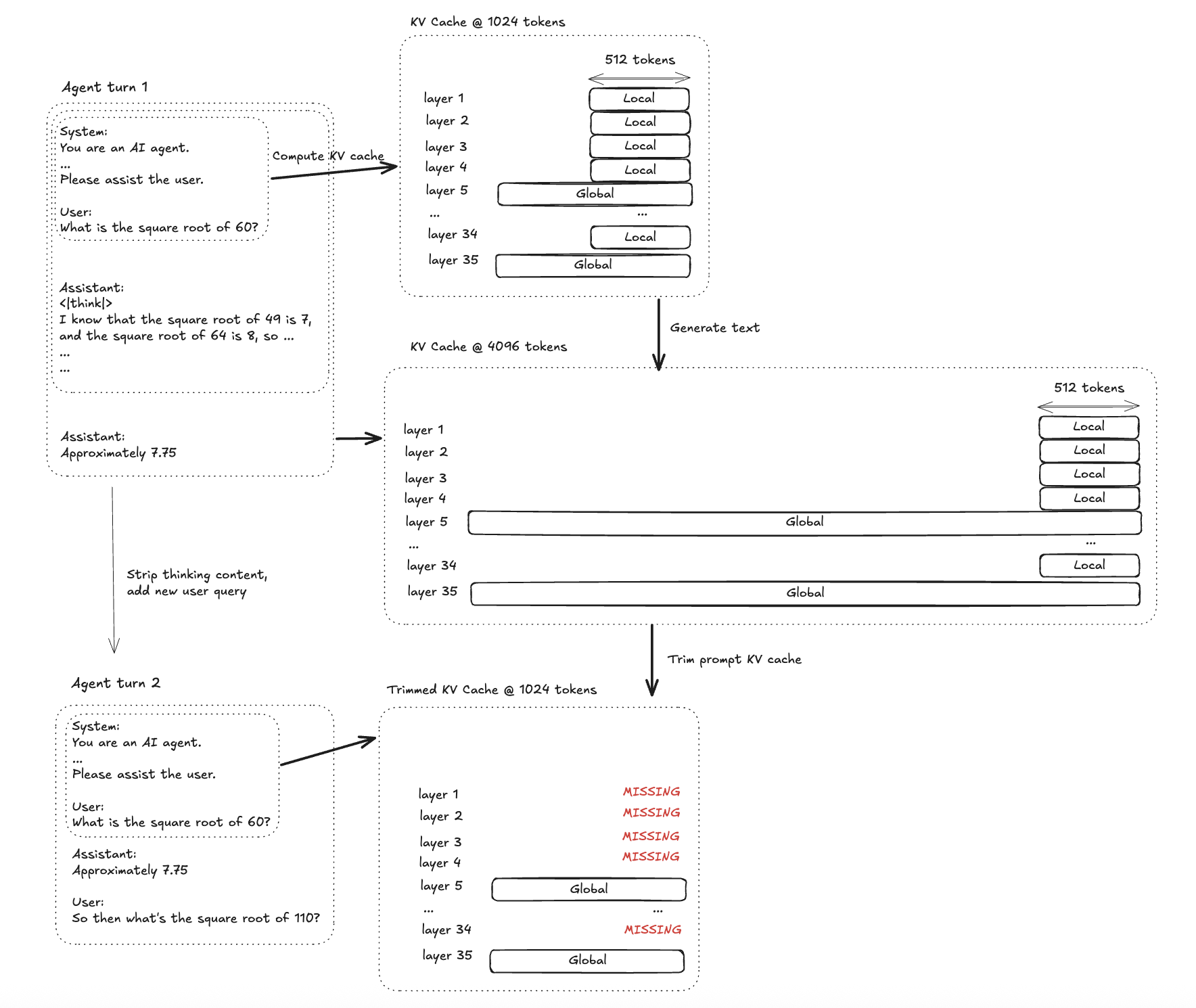
Gemma 4 interleaves local and global attention layers. Rewinding after a reasoning-heavy agent turn can leave parts of the local KV cache missing.
Step 1: Prompt prefill. Compute the KV cache for the system prompt and user message.
Step 2: Decode. Build up the KV cache while computing the assistant reasoning content and assistant message.
Step 3: Rewind. Trim the KV cache to step (1) and append the assistant message without the prior reasoning content.
So, a key problem that inferencing engines have to solve is avoiding re-computation when rewinding the KV cache to prepare a follow-up response.
How we improved prompt caching in mlx-engine
We devised a solution for KV cache rewinding for these agentic use cases. By saving and restoring prompt cache to disk, the KV cache for follow-up requests does not need to be recomputed.
Saving the KV cache to disk
Copying and storing these KV caches at 256-token boundaries lets us restore exact cached prefixes when the corresponding KV cache tensors are still present. If part of the prompt was edited, never computed, or evicted from the disk cache, mlx-engine falls back to recomputing that suffix. 256 tokens is small enough to avoid wasting much work on recomputation, while large enough to keep the disk cache efficient.
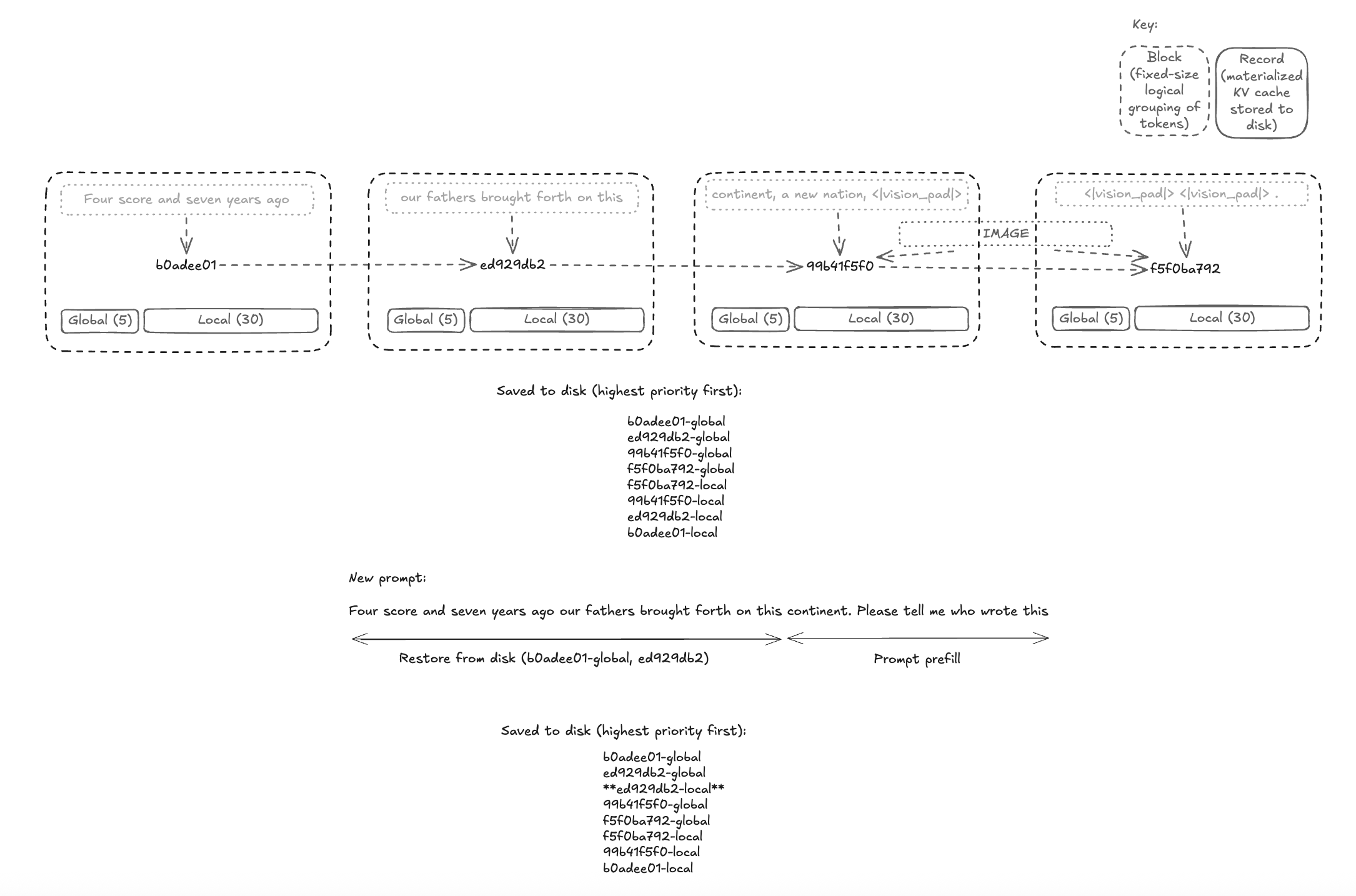
mlx-engine saves KV cache records at fixed 256-token boundaries, then restores the longest available cached prefix for follow-up requests.
First, at every boundary of 256 tokens (sequence len % 256 == 0), stream a copy of the local attention layers' KV cache to a disk-writer backend. While the model is processing the prompt or generating new tokens, a background disk-writing process is running. At every 256 token boundary, the system copies the KV cache corresponding to the most recent 256 tokens and sends it to the disk writer which then persists that block to disk.
Since Apple silicon has a unified-memory architecture, we commit the local attention KV cache to disk and evict it from memory. This ensures that mlx-engine's memory usage footprint scales with active sequences, rather than all previously seen sequences.
Restoring the KV cache from disk
First, calculate a key for each block of 256 tokens. Then, determine which global and local KV cache blocks need to be retrieved. Using the list of keys and cache types for the prompt, load as much KV cache as we can from the disk. For prompt sections that never had their KV cache computed (or had their KV cache evicted from disk), schedule those sections for prompt prefill. The disk cache is an LRU store, so whenever we save to or load from our disk store, the store evicts the least recently used KV cache tensors.
This ensures that our disk store optimizes for the usage pattern. If the engine is sent short prompts using the same system prompt, the system prompt's local attention KV cache will not be evicted, but the KV cache of stale conversations will be evicted. And, if the engine is only receiving requests for one ever-growing conversation, the earlier local attention KV cache will get evicted in order to make room for the longer global attention KV cache.
Disk cache design
We designed the disk cache to clean itself up after the model is unloaded. In other words, the cache is temporary and will not leave persistent files.
The disk cache is one scratch file, not a folder full of independent cache files. We pack many cache records into that one file. Each KV cache entry is a serialized safetensors blob, and the engine keeps an in-memory table saying: “entry X starts at byte offset Y and is Z bytes long.” When KV cache entries are evicted, their byte ranges are returned to a free list and reused by later records; if free space reaches the end of the file, the file is shrunk.
We make the disk cache temporary by using the operating system’s temporary-file mechanism in /tmp, and by treating all lookup metadata as model-lifetime state only. On model unload, the cache store clears its in-memory index and closes the scratch file. If the model process exits, the OS closes the file handle and releases the storage.
And, continuous batching
We also added continuous batching to our vision model runner. Plenty of ink has already been spilled on the implementation and benefits of continuous batching; Hugging Face has a great explainer.
Continuous batching allows users to use the same model for concurrent request processing. Along with the KV cache improvements described earlier, mlx-engine can now be used for serious agentic workloads.
Benchmarks
To make the performance improvements more concrete, we ran a few end-to-end LM Studio API benchmarks on an M3 Max MacBook Pro with 36 GB of RAM, using lmstudio-community/Qwen3.6-27B-MLX-4bit.
These benchmarks focus on the workloads that this update is intended to improve: parallel chat, long-prompt processing, and repeated high-resolution image prompts.
Benchmark: parallel chat throughput
Setup: The model was loaded with parallel=4, then four short chat requests were sent concurrently through the LM Studio API. Each response was allowed to stop naturally.
Result: for this four-way parallel chat workload, mlx-engine v1.8.5 completed the run about 2.2x faster end-to-end, with nearly identical output token counts.
Benchmark: memory under parallel long prompts
Setup: The model was loaded with parallel=4, then four large prompts were sent concurrently through the LM Studio API. RAM usage was measured after the model loaded and again after the run completed.
Result: for this parallel long-prompt workload, mlx-engine v1.8.5 used about 82% less extra RAM after the run, while maintaining similar wall-clock time and slightly higher total token throughput. This is the expected benefit of moving inactive prompt-cache records out of unified memory. The active sequences still need to stay resident, but stale cache records no longer have to keep accumulating in RAM.
Benchmark: repeated high-resolution image prompt
Setup: The same image prompt was sent twice, generating one token per request. This isolates the cost of processing the image-expanded prompt and restoring the prompt cache.
Result: for this repeated high-resolution image prompt, mlx-engine v1.8.5 completed the second request about 3.5x faster. The win comes from restoring most of the image-expanded prompt cache.
And try it out on your Mac with LM Studio: https://lmstudio.ai/download