
OpenClaw
Use OpenClaw with LM Studio
OpenClaw now supports LM Studio as a native model provider. See: OpenClaw Docs.
Pro Tip
Have a powerful LLM rig? Use LM Link to run OpenClaw from your laptop while the model runs on your rig.
Setup
Start LM Studio's local server
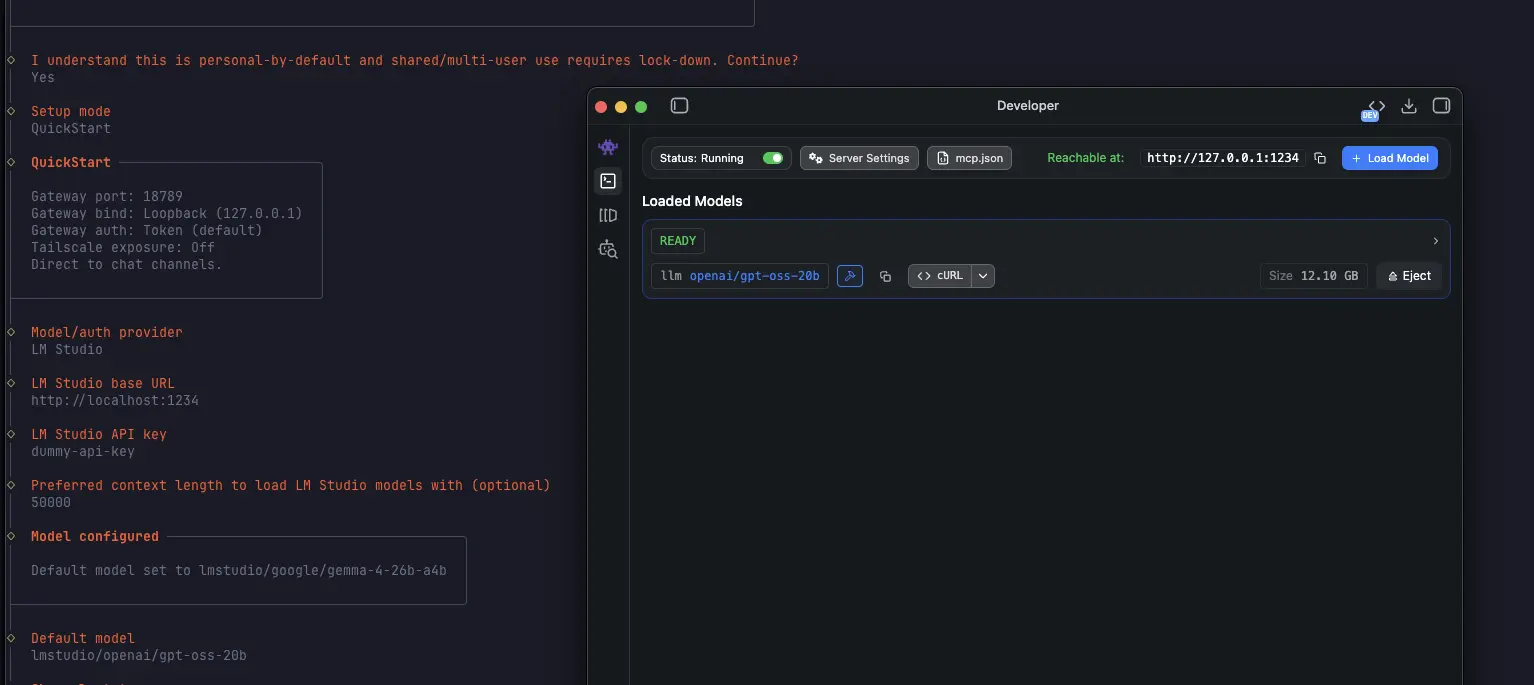
Make sure LM Studio is running as a server (default port 1234).
You can start it from the app, or from the terminal with lms:
lms server start --port 1234Run OpenClaw with LM Studio as model provider
Install OpenClaw as normal or run the OpenClaw onboard command as follows (recommended)
openclaw onboardand complete the interactive setup with LM Studio as your model provider
You can do the onboarding in non-interactive way by using the following command:
openclaw onboard \
  --non-interactive \
  --accept-risk \
  --auth-choice lmstudio \
  --custom-base-url http://localhost:1234/v1 \
  --lmstudio-api-key "$LM_API_TOKEN" \
  --custom-model-id qwen/qwen3.5-9b
Pro Tip
Use a model (and server/model settings) with more than ~50k context length. Tools like OpenClaw can consume a lot of context.
Set up LM Studio as default memory search provider
To use LM Studio as the embedding model provider for memory search, run the following command and restart openclaw gateway
openclaw config set agents.defaults.memorySearch.provider lmstudio
openclaw gateway restart
If you're running into trouble, hop onto our Discord