LM Studio 0.3.5
LM Studio 0.3.5 introduces headless mode, on-demand model loading, and updates to mlx-engine to support Pixtral (MistralAI's vision-enabled LLM).
👾 We are hiring a TypeScript SDK Engineer in NYC to build apps and SDKs for on-device AI
Get the latest LM Studio:
- macOS: Download the
.dmgfile from here. - Windows: Download the
.exefile from here. - Linux: Download the
.AppImagefile from here.
LM Studio as your local LLM background server
In this release we're adding a combination of developer-facing features aimed at making it much more ergonomic to use LM Studio as your background LLM provider. We've implemented headless mode, on-demand model loading, server auto-start, and a new CLI command to download models from the terminal. These features are useful for powering local web apps, code editor or web browser extensions, and much more.
Headless mode
Normally, to use LM Studio's functionality you'd have to keep the application open. This sounds obvious when considering LM Studio's graphical user interface. But for certain developer workflows, mainly ones that use LM Studio exclusively as a server, keeping the application running results in unnecessary consumption of resources such as video memory. Moreover, it's cumbersome to remember to launch the application after a reboot and enable the server manually. No more! Enter: headless mode 👻.
Headless mode, or "Local LLM Service", enables you to leverage LM Studio's technology (completions, chat completions, embedding, structured outputs via llama.cpp or Apple MLX) as local server powering your app.
Once you turn on "Enable Local LLM Service", LM Studio's process will run without the GUI upon machine start up.
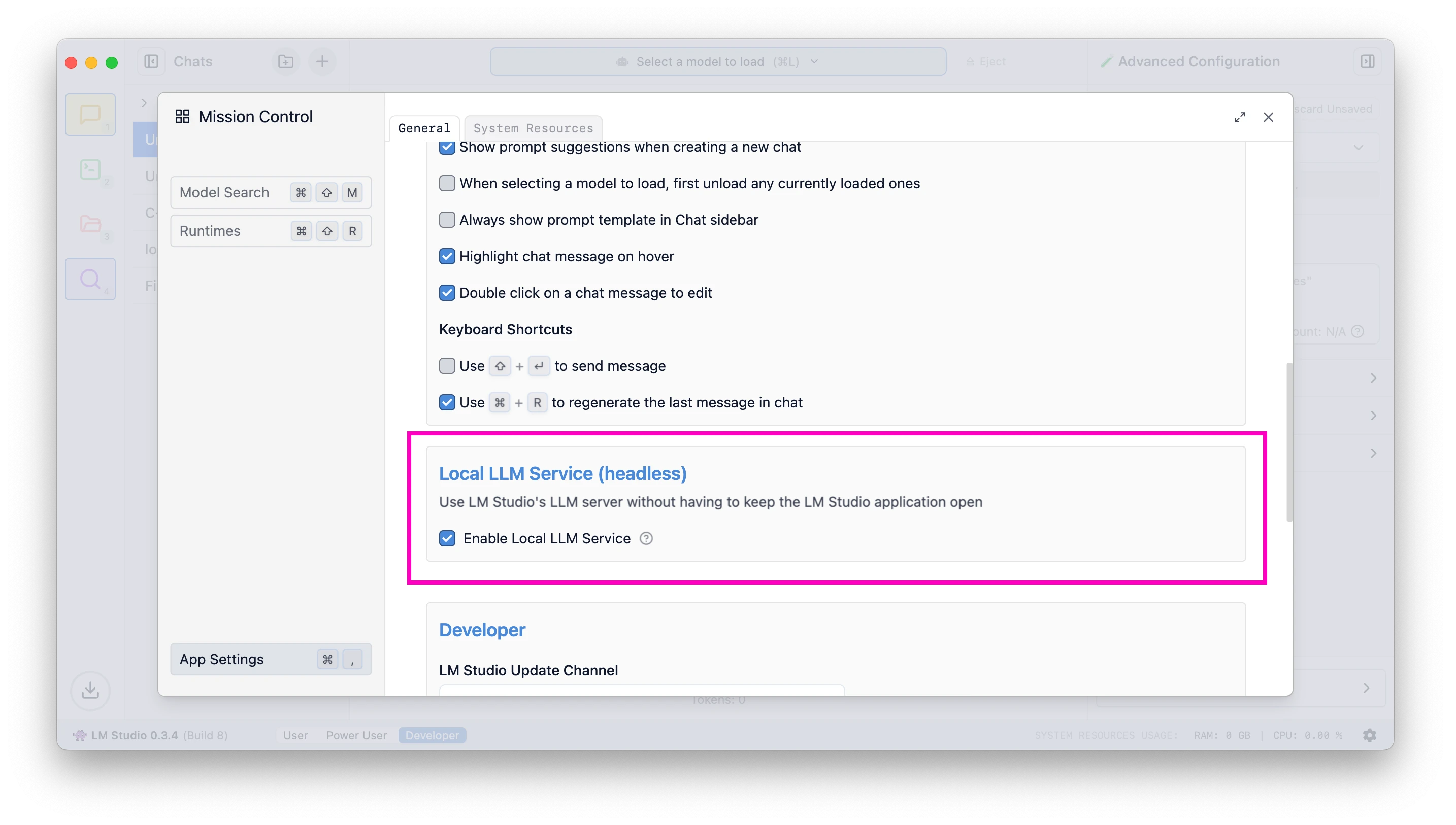
Enable the LLM server to start on machine login
Minimize to tray
To switch into using LM Studio in the background, you can minimize it into the tray. This will hide the dock icon and free up resources taken up by the graphical user interface.
Minimize to tray on Windows
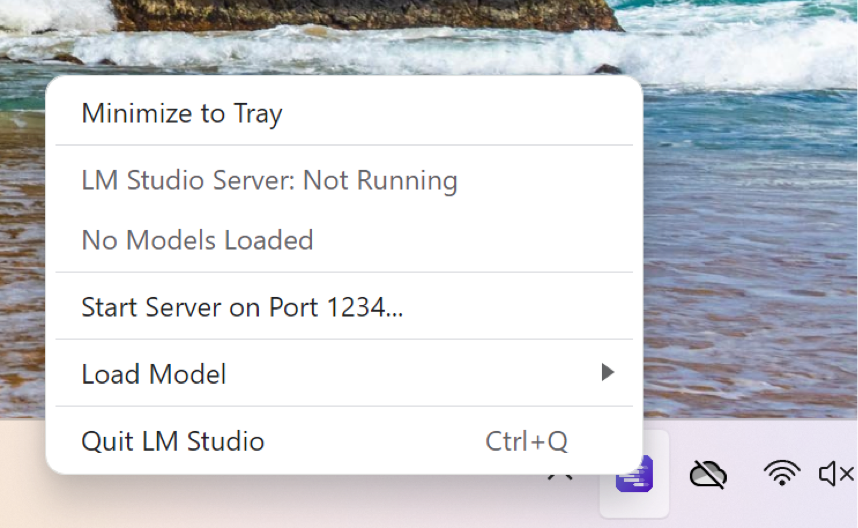
Send LM Studio to run in the background on Windows
Minimize to tray on Mac
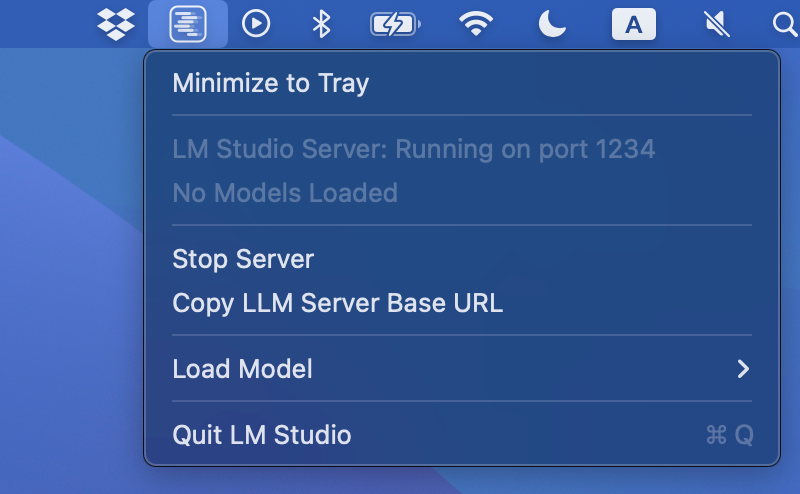
Send LM Studio to run in the background on macOS
Remember last server state
If you turn the server ON, it'll auto-start next time the application starts -- either launched by you, or on start-up when in service mode. The same goes for turning the server OFF.
To ensure the server is on, run the following command:
# Start the server
lms server start
Conversly, to ensure the server is off, run:
# Stop the server
lms server stop
On-demand model loading
Before v0.3.5: if you wanted to use a model through LM Studio you would have had to load it first yourself: either through the UI or via lms load (or through lmstudio-js).
After v0.3.5: to use a model, simply send an inferencing request to it. If the model is not yet loaded, it'll be loaded before your request returns. This means that the first request might take a few seconds until the loading operation finishes, but subsequent calls should be zippy as usual.
Combine on-demand loading with Per-Model Settings
Using on-demand model loading, you might wonder how you could configure load settings such as Context Length, GPU offload %, Flash Attention and more. This can be solved using LM Studio's per-model default settings feature.
Using per-model settings, you can predetermine which load parameters the software will use by default when loading a given model.
🛠️ API change: GET /v1/models behavior
Without JIT loading (pre-0.3.5 default): returns only models that are already loaded into memory
With JIT loading: returns all local models that can be loaded
How to turn on JIT model loading
If you've used LM Studio before, turn on Just-In-Time model loading on by flipping this switch in the Developer tab. New installs have this on by default.
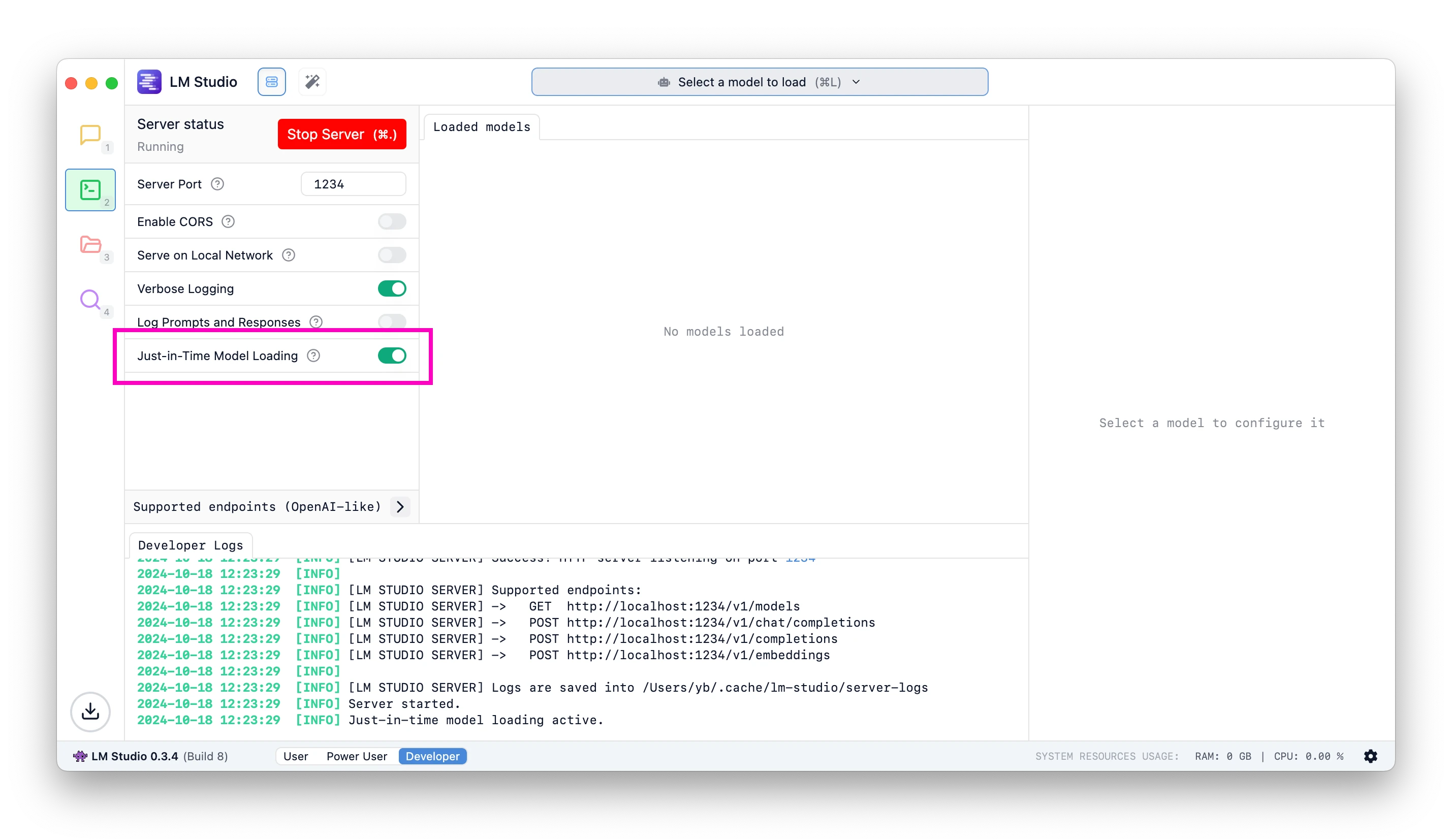
Load models on demand
lms get
LM Studio's CLI, lms, gains a new command to enable you to download models directly from the terminal.
lms is updated automatically when you install a new version of LM Studio.
Download a model: lms get {author}/{repo}
To download Meta's Llama 3.2 1B, run:
lms get bartowski/llama-3.2-1b-instruct-ggufDownload a specific quantization
We're introducing the following notation for signifying quantization: @{quantization}
Get the q4_k_m quant
lms get lmstudio-community/llama-3.2-1b-instruct-gguf@q4_k_mGet the q8_0 quant
lms get lmstudio-community/llama-3.2-1b-instruct-gguf@q8_0Provide an explicit huggingface.co URL
You provide explicit Hugging Face URLs to download a specific model:
lms get https://huggingface.co/lmstudio-community/granite-3.0-2b-instruct-GGUFThe quantization notation works here too!
lms get https://huggingface.co/lmstudio-community/granite-3.0-2b-instruct-GGUF@q8_0This will download the q8_0 quant for this model.
Pixtral support with Apple MLX
In LM Studio 0.3.4 we've introduced support for Apple MLX. Read about it here. In 0.3.5 we've updated the underlying MLX engine (which is open source) and added support for MistralAI's Pixtral!
This was made possible by adopting Blaizzy/mlx-vlm version 0.0.15.
You can download Pixtral through Model Search (⌘ + ⇧ + M) or by using lms get like so:
lms get mlx-community/pixtral-12b-4bitTake it for a spin if your Mac has 16GB+ RAM, preferably 32GB+.
Bug fixes
- [Bug fix] fix RAG reinjecting document into context on follow up prompts
- Fixed RAG not working (https://github.com/lmstudio-ai/mlx-engine/issues/4)
- Fix outline flicker around Mission Control
- [Mac][MLX Engine] Fixed issues with sideloading quantized MLX models (https://github.com/lmstudio-ai/mlx-engine/issues/10)
LM Studio 0.3.5 - Full Changelog
- Run LM Studio as a service (headless)
lms load,lms server startno longer requires launching the GUI- ability to run on machine startup
- Server start / stop button will remember last setting
- This is useful when LM Studio is running as a service
- Improvement to Model Search
- Hugging Face search now happens automatically without Cmd / Ctrl + Enter
- Just-In-Time model loading for OpenAI endpoints
- Button to toggle Mission Control full screen / modal modes
- Update llama.cpp-based JSON response generation; now supports more complex JSON schemas
- Tray menu options to minimize app to tray, copy server base URL
- Checkbox to add
lmsto PATH during onboarding on Linux - [Mac][MLX Vision] Bump mlx-vlm version to
0.0.15, support Qwen2VL - [Mac][MLX Engine] Updated Transformers to
4.45.0 - [UI] Move Chat Appearance control to top bar
- [UI] Tweaks to size of per-message action buttons
- Localization:
- Improved German translation thanks to Goekdeniz-Guelmez
- Indonesian translation thanks to dwirx
Even More
- Download the latest LM Studio app for macOS, Windows, or Linux.
- New to LM Studio? Head over to the documentation: Docs: Getting Started with LM Studio.
- For discussions and community, join our Discord server.
- If you want to use LM Studio at your organization at work, get in touch: LM Studio @ Work