LM Studio 0.3.27: Find in Chat and Search All Chats
LM Studio 0.3.27 is now available as a stable release. Update in-app or download the latest version.
Find in Chat and Search across all chats
New: Find in Chat and Search All Chats
You can now search within the current conversation or across all conversations.
Cmd/Ctrl+F: find within the current conversation. Matches plain text, Markdown, and code blocks — and also searches inside reasoning blocks.- The same
Cmd/Ctrl+Fshortcut works in the large System Prompt editor (open withCmd/Ctrl+E).
- The same
Cmd/Ctrl+Shift+F: search across all conversations.
Find in Chat searches plaintext, Markdown, code blocks, and reasoning blocks in the current chat. For search across chats, we build an in-memory index and search message contents only (reasoning and tool-use blocks are excluded).
Please give us feedback and you try it out! You can also report bugs in lmstudio-bug-tracker.
New: Model Resource Estimates
Before you load, either in the app or with lms load, you have an opportunity to adjust the model load parameters such as the context length or the GPU offload %.
These parameters, along with the model size and other factors, impact the memory requirements for loading the model.
Until now, LM Studio estimated memory usage taking into account the GPU offload and would surface a warning if you were likely to run out of memory.
Starting in 0.3.27, we now also take into account the context length, whether flash attention is enabled, and whether the model is a vision model. This gives you a more accurate estimate of the memory requirements.
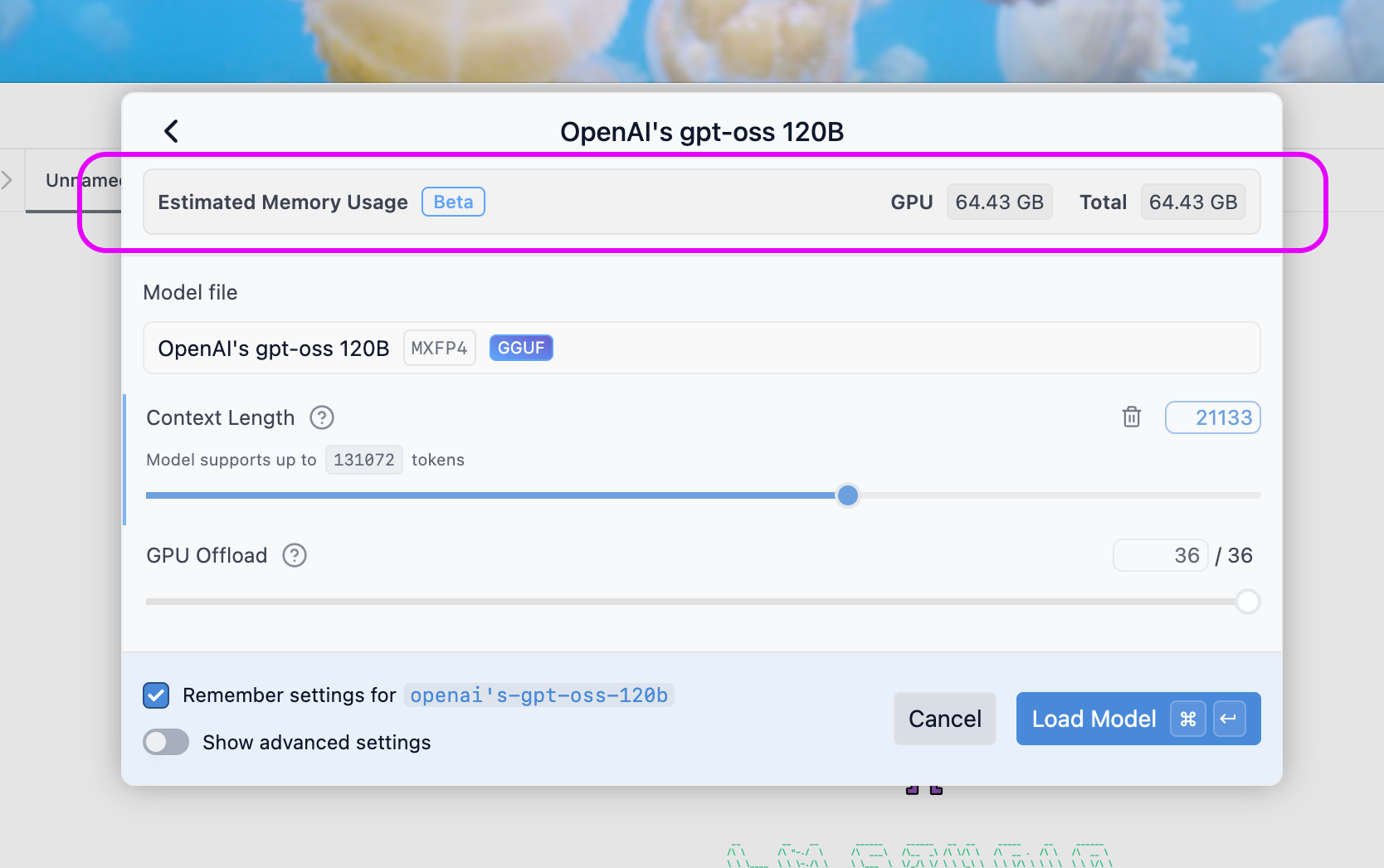
Model load memory estimate taking context length and GPU offload into account
When you adjust the context length or GPU offload slider, you'll see an updated estimate of the memory requirements. If you're likely to run out of memory, you'll see a warning before loading the model. If you believe the estimate is too conservative, you can always override the guardrails and attempt to load the model anyway.
lms load --estimate-only
This functionality is also available in the CLI. You can now perform a "dry run" of loading a model with:
lms load --estimate-only <model-name>
This will not load the model, but will print out an estimate of the memory requirements based on the parameters you provide. It'll take into account --context-length and --gpu if you provide them, or will use defaults if you don't.
A result might look like this:
New: Sort Chats in the Chats Sidebar
You can now sort your chats in the side bar based on date updated, date created, or token count.
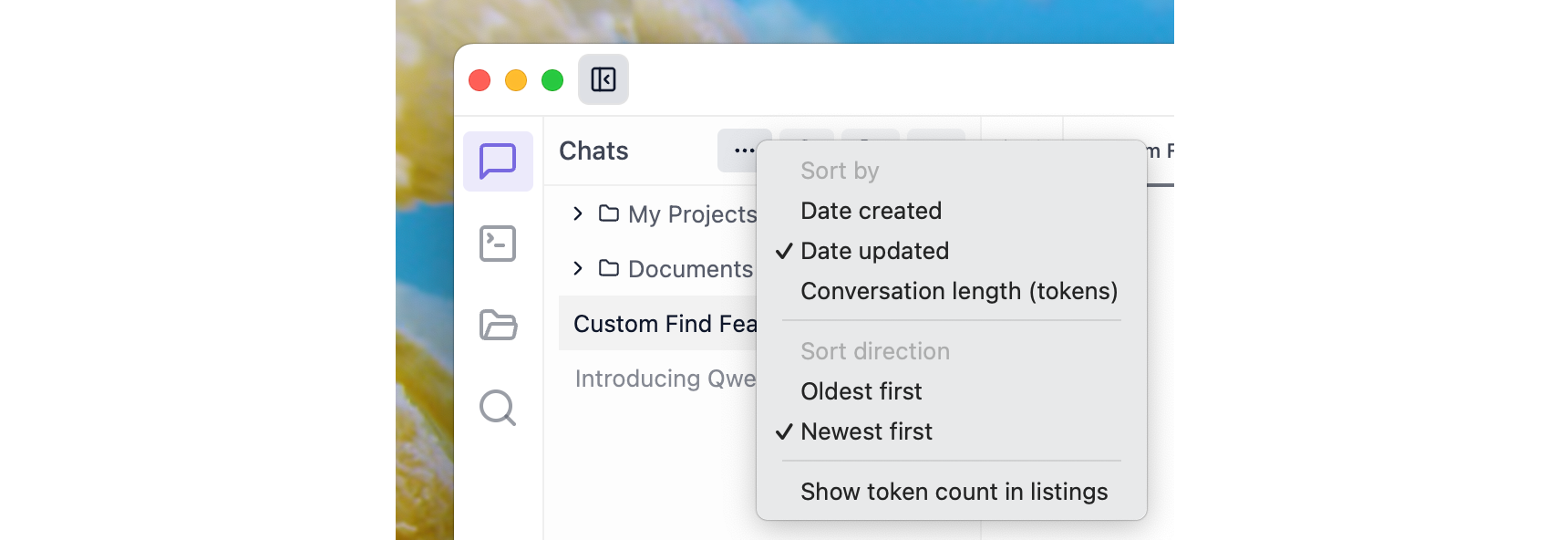
Sort chats by date updated, date created, or token count
Join the LM Studio 0.4.0 private beta
We're about to kick off a beta for LM Studio 0.4.0. It's packed with features and we'd love for you to take it for an early spin + iterate with us. If you're interested, sign up here.
0.3.27 - Release Notes
Build 4
- Improved VRAM usage estimation, especially when flash attention is enabled
Build 3
- Setting to control whether to open the downloads panel after starting a model download (default: false)
- Update CLI (
lms) output colors to have better contrast in light mode - Fix a bug where copy buttons would sometimes not appear on conversation code blocks
Build 2
- New: Find in Chat (Cmd/Ctrl+F) and Search All Chats (Cmd/Ctrl+Shift+F).
- New: Sort chats sidebar by date updated, date created, or token count
- Model resources estimation will now work for vision models
- Added model resources estimation to the CLI. You can now run
lms load --estimate-only <model-name>to preview a model's estimated memory requirements before loading - While using
lms chat, you can now use Ctrl^C to interrupt ongoing predictions
Build 1
- Additional model quantization files downloaded after the main model will now be properly nested under it
- Improved memory usage estimation used for model loading guardrails.
- Now memory estimation will take into account selected context lengths.
lms ps --jsonnow reports model generation status and the number of queued prediction requests
Resources
- Download LM Studio: lmstudio.ai/download
- Report bugs: lmstudio-bug-tracker
- X / Twitter: @lmstudio
- Discord: LM Studio Community