LM Studio 0.3.23
📣 ICYMI: LM Studio is now free for work! Read more https://lmstudio.ai/blog/free-for-work
LM Studio 0.3.23 is now available as a stable release. This build focuses on reliability improvements, performance for underpowered devices, and a handful of bug fixes.
Improve openai/gpt-oss in-chat tool calling reliability
Tool names are now consistently formatted before being sent to the model. Previously, tools with spaces in their names would confuse gpt-oss and lead to tool call failures. Tool names are now converted to snake_case.
Additionally, we squashed a few parsing bugs that could have previously led to parsing errors in the chat. You might notice significant improvements in tool calling reliability.
Reasoning Content from gpt-oss using the Chat Completions endpoint
This is a change in behavior compared with version 0.3.22.
message.contentwill no longer include reasoning content or<think>tags.- Reasoning is now in
choices.message.reasoning(non-streaming) andchoices.delta.reasoning(streaming). - This matches the behavior of
o3-mini.
Force MoE expert weights onto CPU or GPU
In this version, we added an advanced model load setting to place all MoE expert weights onto the CPU or GPU (default).
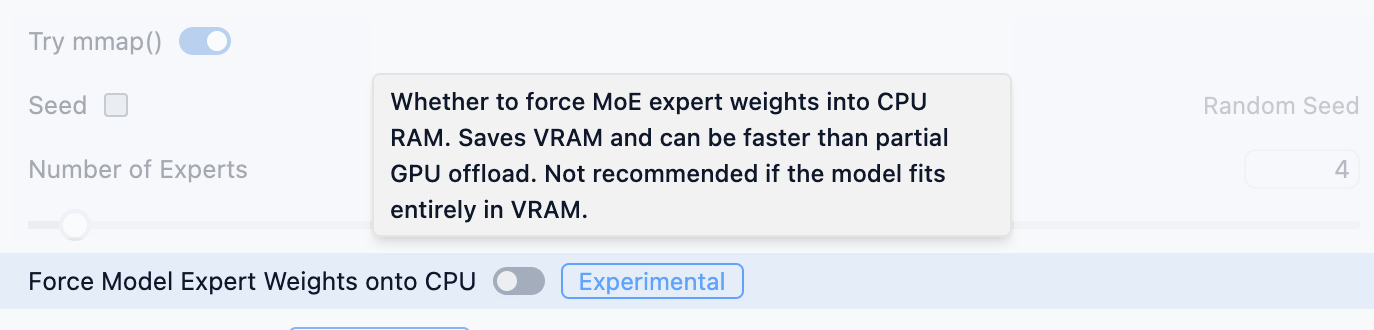
Turn on to force MoE expert weights on CPU. Try this for low VRAM machines
This is beneficial if you don't have enough VRAM to offload the entire model to GPU dedicated memory. If this is the case, try to turn on the "Force Model Expert Weights onto CPU" option in the advanced load settings.
If you can offload the entire model to GPU memory, you're better off sticking with placing expert weights onto the GPU as well (this is the default option).
This is utilizing the same underlying technology as llama.cpp's --n-cpu-moe.
Recall that you can set persistent per-model settings. See the docs for more info.
LM Studio 0.3.23 - Full Release Notes
Upgrade via in-app update, or from https://lmstudio.ai/download.
Build 3
- [llama.cpp][MoE] Add ability to offload expert weights to CPU/GPU RAM via "Force Model Expert Weights onto CPU" in advanced load settings
- Tool names are normalized before being provided to the model (replace whitespaces, special chars)
Build 2
- Fix "Complete Download" button sometimes not working when downloading a staff-picked model
- Fix "Fix" button not working for extension packs (like Harmony)
- Fix "Cannot read properties of undefined (reading 'properties')" for certain tools-containing requests to
/v1/chat/completions - Fix
Error: EPERM: operation not permitted, unlinkwhen auto-updating harmony
Build 1
- Bug fixes resulting in significant improvements for in chat tool calling reliability
- Fixed a bug where some old conversations won't load in the app
- Fixed a bug where tool call will fail sometimes when used via OpenAI compatible API in non-streaming mode
- Fix models not outputting thinking tags in
v1/chat/completions- For gpt-oss:
message.contentwill not include reasoning content or special tags- This matches the behavior of
o3-mini. - Reasoning content will be in
choices.message.reasoning(stream=false) andchoices.delta.reasoning(stream=true)
- For gpt-oss:
- Fix "TypeError: Invalid Version" causing app functionality issues on machines with AMD+NVIDIA GPUs
- Fix bug where MCP plugin chip name was not rendering in User Mode
- Fix bug where search results were refreshing on click
Resources
- Download LM Studio: lmstudio.ai/download
- Report bugs: lmstudio-bug-tracker
- X / Twitter: @lmstudio
- Discord: LM Studio Community