Presets are a way to bundle together a system prompt and other parameters into a single configuration that can be easily reused across different chats.
New in 0.3.15: You can [import](/docs/app/presets/import) Presets from file or URL, and even [publish](/docs/app/presets/publish) your own Presets to share with others on to the LM Studio Hub.
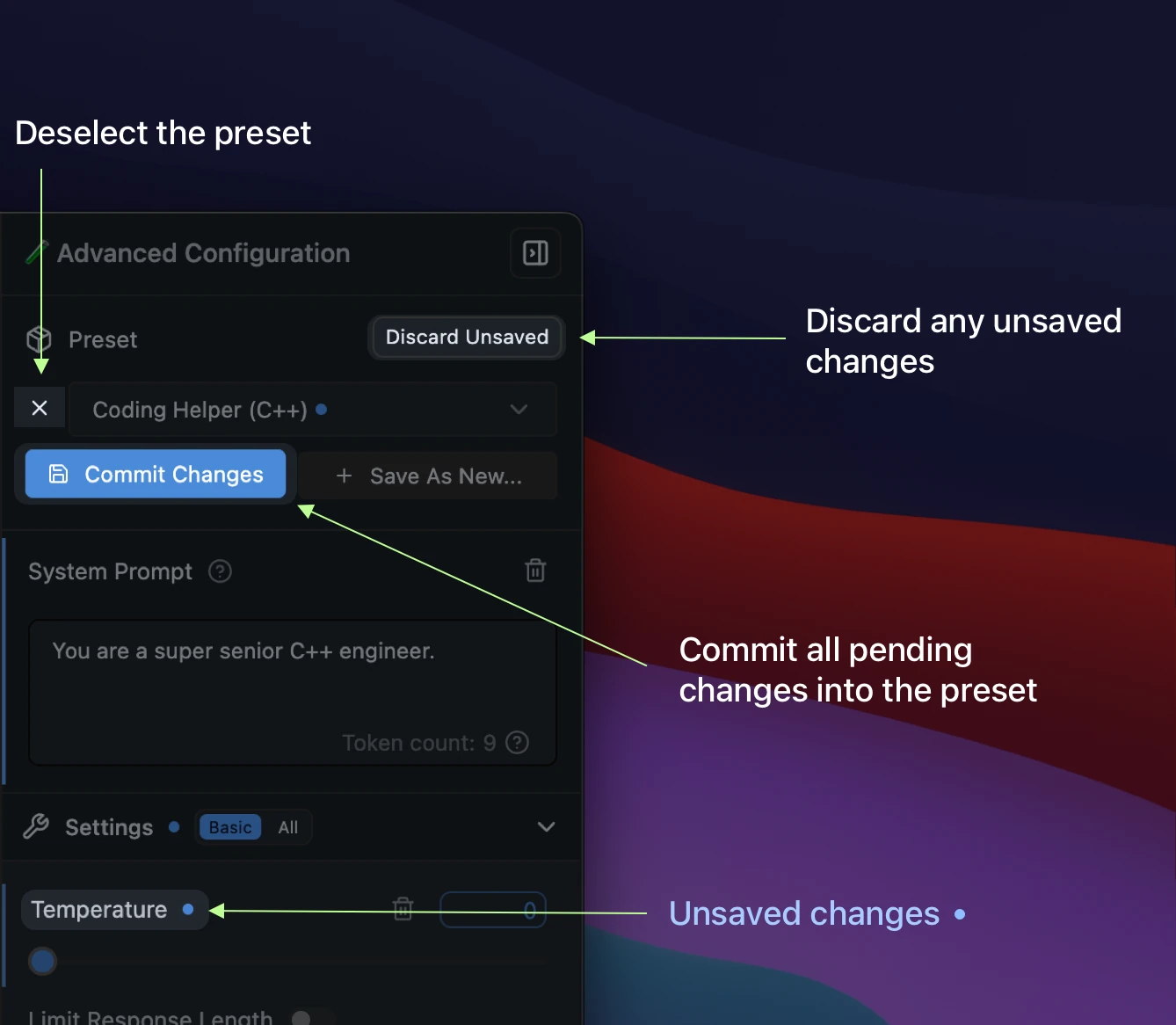
Saving, resetting, and deselecting Presets [#saving-resetting-and-deselecting-presets]
Below is the anatomy of the Preset manager:
Importing, Publishing, and Updating Downloaded Presets [#importing-publishing-and-updating-downloaded-presets]
Presets are JSON files. You can share them by sending around the JSON, or you can share them by publishing them to the LM Studio Hub.
You can also import Presets from other users by URL. See the [Import](/docs/app/presets/import) and [Publish](/docs/app/presets/publish) sections for more details.
Example: Build your own Prompt Library [#example-build-your-own-prompt-library]
You can create your own prompt library by using Presets.
In addition to system prompts, every parameter under the Advanced Configuration sidebar can be recorded in a named Preset.
For example, you might want to always use a certain Temperature, Top P, or Max Tokens for a particular use case. You can save these settings as a Preset (with or without a system prompt) and easily switch between them.
The Use Case for Presets [#the-use-case-for-presets]
* Save your system prompts, inference parameters as a named `Preset`.
* Easily switch between different use cases, such as reasoning, creative writing, multi-turn conversations, or brainstorming.
Where Presets are stored [#where-presets-are-stored]
Presets are stored in the following directory:
macOS or Linux [#macos-or-linux]
```xml
~/.lmstudio/config-presets
```
Windows [#windows]
```xml
%USERPROFILE%\.lmstudio\config-presets
```
Migration from LM Studio 0.2.* Presets [#migration-from-lm-studio-02-presets]
* Presets you've saved in LM Studio 0.2.\* are automatically readable in 0.3.3 with no migration step needed.
* If you save **new changes** in a **legacy preset**, it'll be **copied** to a new format upon save.
* The old files are NOT deleted.
* Notable difference: Load parameters are not included in the new preset format.
* Favor editing the model's default config in My Models. See [how to do it here](/docs/configuration/per-model).
Community [#community]
Chat with other LM Studio users, discuss LLMs, hardware, and more on the [LM Studio Discord server](https://discord.gg/aPQfnNkxGC).
 Importing, Publishing, and Updating Downloaded Presets [#importing-publishing-and-updating-downloaded-presets]
Presets are JSON files. You can share them by sending around the JSON, or you can share them by publishing them to the LM Studio Hub.
You can also import Presets from other users by URL. See the [Import](/docs/app/presets/import) and [Publish](/docs/app/presets/publish) sections for more details.
Example: Build your own Prompt Library [#example-build-your-own-prompt-library]
You can create your own prompt library by using Presets.
In addition to system prompts, every parameter under the Advanced Configuration sidebar can be recorded in a named Preset.
For example, you might want to always use a certain Temperature, Top P, or Max Tokens for a particular use case. You can save these settings as a Preset (with or without a system prompt) and easily switch between them.
The Use Case for Presets [#the-use-case-for-presets]
* Save your system prompts, inference parameters as a named `Preset`.
* Easily switch between different use cases, such as reasoning, creative writing, multi-turn conversations, or brainstorming.
Where Presets are stored [#where-presets-are-stored]
Presets are stored in the following directory:
macOS or Linux [#macos-or-linux]
```xml
~/.lmstudio/config-presets
```
Windows [#windows]
```xml
%USERPROFILE%\.lmstudio\config-presets
```
Migration from LM Studio 0.2.* Presets [#migration-from-lm-studio-02-presets]
* Presets you've saved in LM Studio 0.2.\* are automatically readable in 0.3.3 with no migration step needed.
* If you save **new changes** in a **legacy preset**, it'll be **copied** to a new format upon save.
* The old files are NOT deleted.
* Notable difference: Load parameters are not included in the new preset format.
* Favor editing the model's default config in My Models. See [how to do it here](/docs/configuration/per-model).
Importing, Publishing, and Updating Downloaded Presets [#importing-publishing-and-updating-downloaded-presets]
Presets are JSON files. You can share them by sending around the JSON, or you can share them by publishing them to the LM Studio Hub.
You can also import Presets from other users by URL. See the [Import](/docs/app/presets/import) and [Publish](/docs/app/presets/publish) sections for more details.
Example: Build your own Prompt Library [#example-build-your-own-prompt-library]
You can create your own prompt library by using Presets.
In addition to system prompts, every parameter under the Advanced Configuration sidebar can be recorded in a named Preset.
For example, you might want to always use a certain Temperature, Top P, or Max Tokens for a particular use case. You can save these settings as a Preset (with or without a system prompt) and easily switch between them.
The Use Case for Presets [#the-use-case-for-presets]
* Save your system prompts, inference parameters as a named `Preset`.
* Easily switch between different use cases, such as reasoning, creative writing, multi-turn conversations, or brainstorming.
Where Presets are stored [#where-presets-are-stored]
Presets are stored in the following directory:
macOS or Linux [#macos-or-linux]
```xml
~/.lmstudio/config-presets
```
Windows [#windows]
```xml
%USERPROFILE%\.lmstudio\config-presets
```
Migration from LM Studio 0.2.* Presets [#migration-from-lm-studio-02-presets]
* Presets you've saved in LM Studio 0.2.\* are automatically readable in 0.3.3 with no migration step needed.
* If you save **new changes** in a **legacy preset**, it'll be **copied** to a new format upon save.
* The old files are NOT deleted.
* Notable difference: Load parameters are not included in the new preset format.
* Favor editing the model's default config in My Models. See [how to do it here](/docs/configuration/per-model).